 Tend Block
Ads & Trackers
Blocks requests to known ad and tracking networks before they load, and hides the empty ad slots they leave behind.
Free
Tend Block blocks ads and trackers, hides cookie pop-ups and quiets distractions, right inside Safari on your Mac. With Pro, it answers cookie pop-ups for you instead of just hiding them.
Each is its own Safari extension, so you can switch it on or off on its own. Safari applies their rules itself, so pages never wait on Tend Block.
Blocks requests to known ad and tracking networks before they load, and hides the empty ad slots they leave behind.
Free
Hides common cookie consent pop-ups so you can get to the page. Hiding sends the site no answer; with Pro, Tend Block answers for you.
Free to hide, Pro to answer
Hides chat bubbles, newsletter pop-ups, notification sign-up boxes and sticky share bars, plus Shorts and trending panels on YouTube, X and LinkedIn.
Pro
When a pop-up is only hidden, the site never hears your answer. With Pro, Tend Block Helper picks the site's own Reject button for you, or Accept all if that's what you prefer.
The pop-up is out of your way. The site gets no answer either way.
Tend Block chooses Reject on the site's own pop-up, so the site records that you said no.
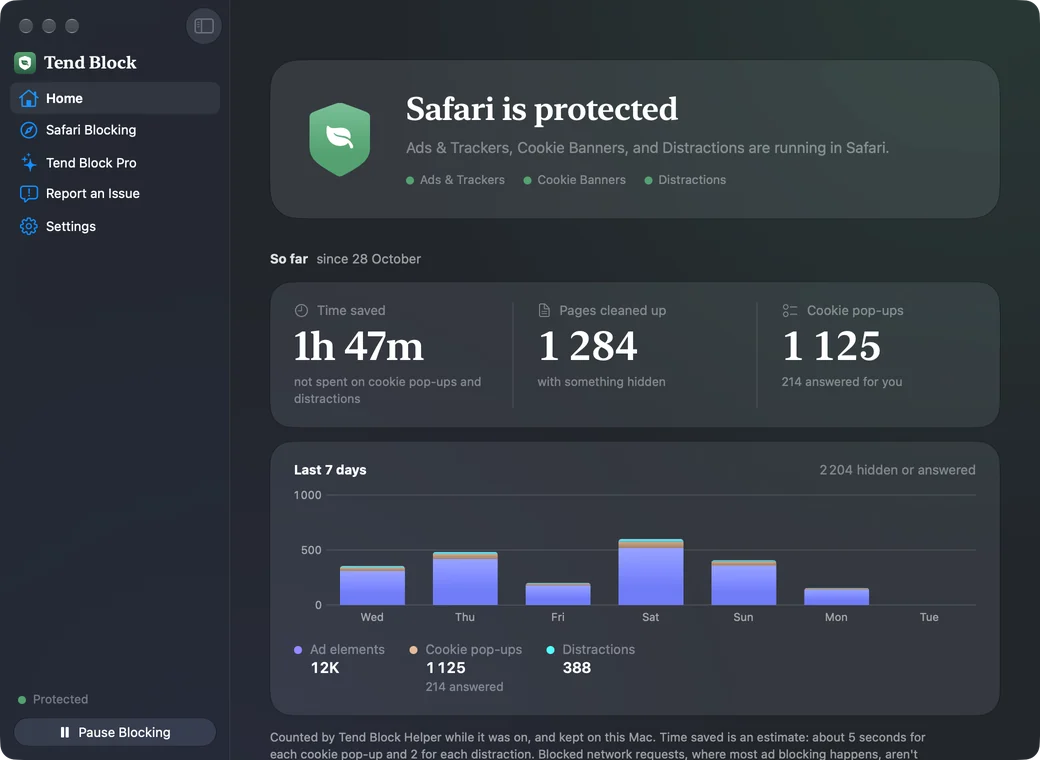
Home shows the time you didn't spend on cookie pop-ups and distractions, the pages it cleaned up, and your last seven days, blocker by blocker.
Tend Block doesn't ask who you are, and has no tracking or analytics of its own. It makes no network connections.
The blockers hand Safari their rules, and Safari applies them. They never see the pages you visit.
The optional Helper keeps counts on your Mac, never sites or addresses, and skips private windows.
The details are in the privacy policy.
Blocking ads and hiding cookie pop-ups stay free. Pro adds the parts that take more work.
$0
For as long as you use it.
$9.99a year
Or $1.99 a month. The yearly plan starts with a 7-day free trial.
Prices in US dollars; the App Store shows the price for your country. Pro renews automatically until you cancel it in your App Store account settings.
Safari on any Mac with macOS 14 Sonoma or later. Tend Block works only in Safari, because it uses Safari's own content blocking.
Open Tend Block, then in Safari choose Settings, then Extensions, and tick the three Tend Block blockers. For counts on Home and cookie answers with Pro, also tick Tend Block Helper and allow it on all websites. The app shows what's on and what isn't.
No. Hiding sends the site no answer at all. If you want the site to record a choice, Pro answers the pop-up for you, with Reject non-essential unless you pick otherwise.
No blocker does. Tend Block blocks known ad and tracking networks and hides common ad slots, with lists written and tested for Safari. Ads served from a site's own servers, and most video ads, can get through. Report them from the app and we'll look at adding rules.
Add it to your allowed sites in Tend Block's Settings, and nothing is blocked there. To switch everything off for a while, click Pause Blocking. Report an Issue in the app sends us the address so we can fix the rule.
Yes. Tend Block is part of Tend, a family of Mac apps from the same maker. Tend looks after your Mac's battery, heat and storage.